
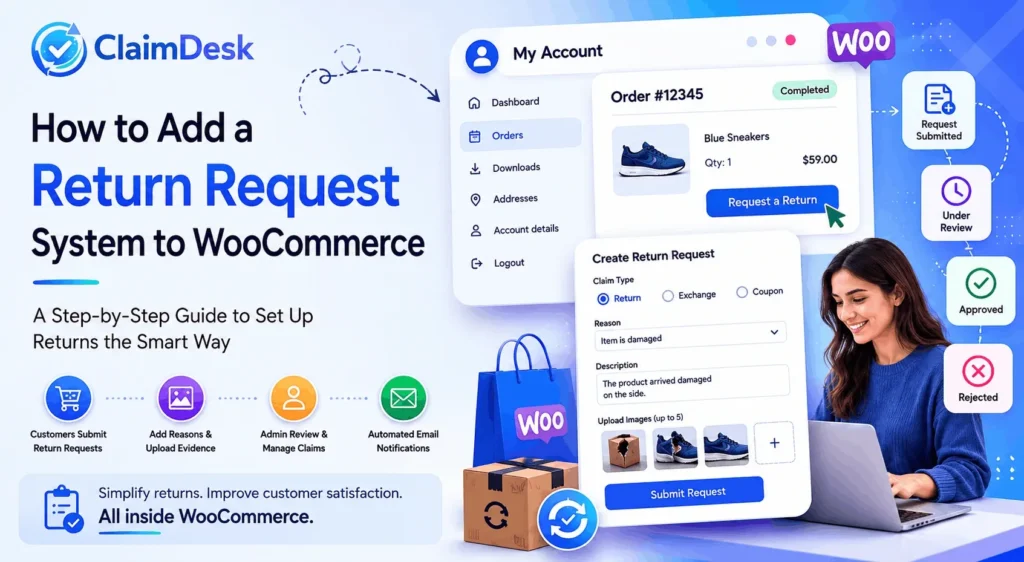
Returns are a normal part of running an eCommerce business. Whether a customer receives a damaged item, orders the wrong size, or simply changes their mind, having a clear and efficient return process is essential for maintaining customer trust.
Unfortunately, many WooCommerce stores still handle return requests through emails, contact forms, spreadsheets, or social media messages. This often leads to delayed responses, lost requests, and frustrated customers.
The solution is to implement a dedicated WooCommerce return request system that allows customers to submit return requests directly from their account while giving store administrators a structured workflow for managing claims.
In this guide, we’ll show you how to add a return request system to WooCommerce and why it can significantly improve your post-purchase customer experience.
Table of Contents
🤔 Why Your WooCommerce Store Needs a Return Request System
Without a dedicated return management process, store owners often face:
- Return requests scattered across multiple channels
- Difficulty tracking claim statuses
- Delayed customer responses
- Increased support workload
- Lack of documentation and evidence
- Poor customer satisfaction
A structured return request system centralizes the entire process and makes it easier for both customers and store administrators.
✅ Benefits of a WooCommerce Return Request System
- Faster return processing
- Better customer experience
- Reduced manual work
- Clear documentation of claims
- Centralized claim management
- Automated customer notifications
- Better dispute resolution
🛠️ What Should a Good WooCommerce Return Request System Include?
When evaluating a returns solution, look for features such as:
👤 Customer Self-Service Returns
Customers should be able to initiate a return request from their account without contacting support.
📝 Claim Reason Selection
Allow customers to specify why they want to return a product, such as:
- Damaged item
- Wrong product received
- Defective product
- Missing parts
- Product not as described
📷 Evidence Upload
Customers should be able to upload images that help verify their claim.
📊 Status Tracking
Both customers and administrators should be able to track claim progress.
👨💼 Admin Review Workflow
Store managers need tools to review, approve, reject, or resolve claims efficiently.
📧 Email Notifications
Automated notifications keep customers informed throughout the process.
🚀 How to Add a Return Request System to WooCommerce
The easiest way to add a professional return request workflow is by using a dedicated claims management plugin such as ClaimDesk.
1️⃣ Step 1: Install and Activate ClaimDesk
Install ClaimDesk on your WooCommerce store and activate the plugin.
Once activated, ClaimDesk integrates directly with WooCommerce and adds return request functionality to customer orders.
⚙️ Step 2: Configure Return Settings
Navigate to the ClaimDesk settings area and configure:
- Claim window duration
- Return reasons
- Product conditions
- Resolution types
- Reminder email schedules
This allows you to tailor the return process to your store’s policies.
🛒 Step 3: Enable Customer Return Requests
Customers can access their completed orders through:
My Account → Orders
Eligible products will display an option to submit a claim or return request.
📋 Step 4: Collect Return Details
When customers create a return request, they can provide:
- Claim type
- Return reason
- Product condition
- Detailed description
- Refund method
- Supporting images
This ensures administrators receive all necessary information from the start.
🖥️ Step 5: Review Claims from the Admin Dashboard
Store administrators can manage all return requests from a centralized claims dashboard.
From here, they can:
- View claim details
- Review uploaded evidence
- Approve claims
- Reject claims
- Monitor claim statuses
🔔 Step 6: Keep Customers Updated Automatically
ClaimDesk automatically sends notifications when:
- A claim is submitted
- A claim status changes
- A claim requires attention
- Reminder emails are triggered
This reduces support inquiries and improves customer communication.
💡 How ClaimDesk Simplifies WooCommerce Returns
ClaimDesk is designed specifically to streamline post-purchase claim management inside WooCommerce.
Instead of relying on scattered emails and manual processes, ClaimDesk creates a structured workflow that helps both customers and store administrators.
Key capabilities include:
- Return request management
- Exchange request handling
- Coupon/store credit requests
- Image evidence uploads
- Quantity validation
- Claim status tracking
- Automated email notifications
- Admin approval workflows
- Configurable claim policies
Everything stays inside WooCommerce, making it easier to manage returns at scale.
🎯 Best Practices for Managing WooCommerce Returns
Create Clear Return Policies
Customers should know:
- What items are eligible for returns
- Return time limits
- Refund conditions
- Exchange procedures
Request Supporting Evidence
Images can help verify claims quickly and reduce disputes.
Respond Quickly
Faster response times lead to higher customer satisfaction and improved retention.
Automate Communication
Automated updates reduce support tickets and keep customers informed.
Track Return Trends
Monitoring claim reasons can help identify product quality issues and operational improvements.
❓ Frequently Asked Questions
Can WooCommerce handle return requests by default?
WooCommerce does not include a dedicated return request management system. Most stores require a plugin to create a structured returns workflow.
Why should I use a WooCommerce return request plugin?
A plugin helps centralize claims, automate communication, collect evidence, and simplify claim management.
Can customers upload images with their return requests?
Yes. ClaimDesk allows customers to upload supporting images when submitting a claim.
Can I approve or reject return requests?
Yes. Administrators can review each claim and approve or reject it from the claims dashboard.
Does ClaimDesk support exchanges?
Yes. ClaimDesk supports return requests, exchanges, and optional coupon/store credit resolutions.
🎉 Final Thoughts
A smooth return experience can be the difference between losing a customer and earning a loyal one. While returns are often viewed as an operational challenge, they also present an opportunity to build trust and improve customer satisfaction.
By implementing a dedicated WooCommerce return request system, store owners can reduce manual work, improve transparency, and provide a professional post-purchase experience.
If you’re looking for a structured way to manage WooCommerce returns, ClaimDesk provides everything you need to collect claims, review evidence, track statuses, and resolve customer issues directly within WooCommerce.